
Paid [XTR] Enforce Post Rules 1.0.6
![[XTR] Enforce Post Rules](/data/dbtechEcommerce/productIcons/0/47.webp?1743012574)
If a user does not accept to the rules they will be unable to create the thread.
Ürün Lisans Ücreti
- 3 Aylık lisans ücreti
- 20.00 $
- Lisans yenileme ücreti
- 15.00 $
- 6 Aylık lisans ücreti
- 30.00 $
- Lisans yenileme ücreti
- 20.00 $
Add-on Branding removal
- Marka kaldırma ücreti
- 20.00 $
-
 EnforcePostRules_Options.webp
 -
 EnforcePostRules_Node.webp
 -
 EnforcePostRules_Post_Thread-1.webp
 -
 EnforcePostRules_Post_Thread-2.webp
 -
 EnforcePostRules_Post_Thread-Scroll.webp
 -
 EnforcePostRules_Options_Scroll.webp
 -
 EnforcePostRules_Post_Thread-3.webp
 -
 EnforcePostRules_Qucik_Post_Thread.webp
 -
 EnforcePostRules_Perm.webp
Genel Bakış Ürün Özellikleri Telif Hakkı Bilgisi Sürümler (7) İncelemeler (2)
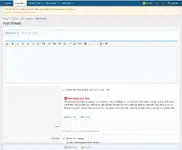
After installing and configuring, (enter the post terms and rules per node) members will be prompted to check a box stating they have read the node post rules with a link to those rules. If a user does not accept to the rules they will be unable to create the thread.
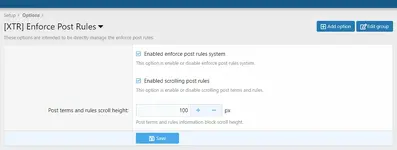
These options are intended to be directly manage the enforce post rules.

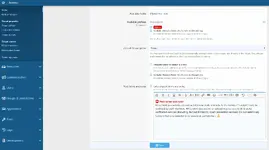
You can enter and manage the post terms and rules per nodes.
Like as below;

Now, it's time to check to result,
As you see the below, Main forum has a post terms and rules!

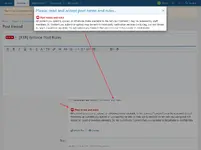
Member can display the terms and rules via two section,
1. Overlay
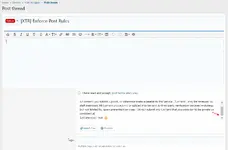
2. Post terms and rule info block (scrolling is supported)

If the specified content/entered rule (Post Terms and Rules) is higher than scroll height, scrolling option will be active.

Also you can manage the scroll height (to when it will be active) via add-on options.

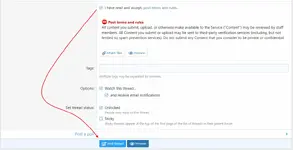
When members accept the rules Post Thread button will be enable.

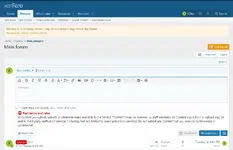
Quick post thread option has supported with same conditions and design.
Before read and accept to rules,

So, can we exclude these rules for specific user groups?
You can do it via permissions.

Now, It's time to set the rules for other nodes ...
These options are intended to be directly manage the enforce post rules.
You can enter and manage the post terms and rules per nodes.
Like as below;
Now, it's time to check to result,
As you see the below, Main forum has a post terms and rules!
Member can display the terms and rules via two section,
1. Overlay
2. Post terms and rule info block (scrolling is supported)
If the specified content/entered rule (Post Terms and Rules) is higher than scroll height, scrolling option will be active.
Also you can manage the scroll height (to when it will be active) via add-on options.
When members accept the rules Post Thread button will be enable.
Quick post thread option has supported with same conditions and design.
Before read and accept to rules,
So, can we exclude these rules for specific user groups?
You can do it via permissions.
Now, It's time to set the rules for other nodes ...
Yasal Uyarı
İçerik sağlayıcı paylaşım sitesi olarak hizmet veren xentr.net adresimizde 5651 Sayılı Kanun'un 8. Maddesine ve T.C.K' nın 125. Maddesine göre tüm üyelerimiz yaptıkları paylaşımlardan kendileri sorumludur. XenTR.Net hakkında yapılacak tüm hukuksal şikayetler iletişim linkimizden bize ulaşıldıktan en geç 3 (üç) gün içerisinde ilgili kanunlar ve yönetmelikler çerçevesinde tarafımızca incelenerek, gereken işlemler yapılacak ve site yöneticilerimiz tarafından bilgi verilecektir.