
![[XTR] Tools Suite](/data/product_icons/0/104_s.jpg?1777593886)
![[XTR] Tools Suite](/data/xentr/ds/covers/0/104.jpg?1777596649)
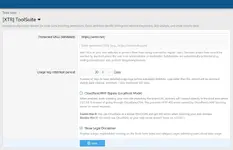
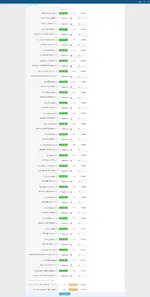
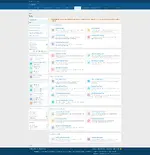
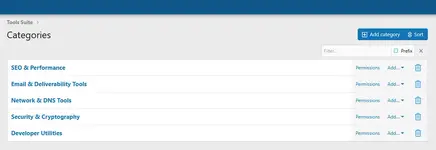
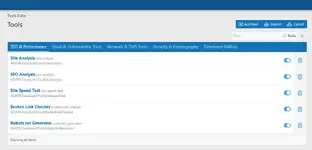
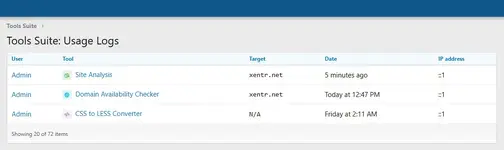
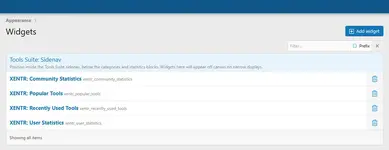
XENTR Tools Suite is a comprehensive addon package developed specifically for XenForo 2.3.x forum software, featuring 20+ professional web tools. Designed for webmasters, developers, and SEO specialists, these tools are built to speed up your daily workflow and simplify technical analysis.The addon offers category-based organization, user-based daily quota management, detailed usage logs, and full control via the admin panel. Each tool is presented with a modern, user-friendly interface.
 Tool List
 DNS & Network Tools
- DNS Lookup - Query A, AAAA, NS, MX, SOA, TXT, CNAME, SRV, CAA, DS, NAPTR, TLSA records. Includes DNSSEC analysis and security score.
- WHOIS Lookup - View domain registration info, nameservers, registration/expiration dates.
- MX Lookup - Check mail exchange records and priority values.
- SPF Lookup - Analyze Sender Policy Framework records, verify email sending permissions.
- DKIM Lookup - Query DomainKeys Identified Mail records, verify email signature authentication.
- DMARC Lookup - Analyze DMARC policies, check email authentication settings.
- IP Geolocation - View geographic location, ISP info, and timezone for IP addresses.
- Port Scanner - Scan open ports on a host, discover service information.
- Ping Tool - Measure server response time, check packet loss rate.
- Ping Trace / Traceroute - Trace network path, measure response time for each hop.
 Security Tools
- SSL Checker - Check SSL/TLS certificate details, validity dates, issuer info, and certificate chain.
- Blacklist Check - Check if your IP or domain is on spam blacklists. Queries 50+ blacklist databases.
- Headers Check - Analyze HTTP response headers, check security headers (HSTS, CSP, X-Frame-Options, etc.).
- Site Analysis - Analyze overall website security status, view open information and server details.
 SEO & Performance Tools
- SEO Analysis - Analyze meta tags, heading structure, image optimization, internal/external links. Get SEO score and recommendations.
- Site Speed Test - Measure website loading time, view performance metrics.
- Broken Link Checker - Detect broken links on web pages, view HTTP status codes and anchor texts.
- Robots.txt Generator - Create robots.txt files for search engines, define crawl rules.
- Domain Availability - Check domain availability, learn availability for popular TLDs.
 Developer Tools
- Base64 Encode/Decode - Encode or decode text data in Base64 format.
- Password Generator - Generate secure, random passwords. Customize with length and character options.
- Version Calculator - Compare XenForo and addon versions, check update status.
- CSS to LESS Converter - Convert CSS code to XenForo LESS format. Auto-suggests XenForo variables with style property integration.
 Addon Features
- Category System - Organize tools in hierarchical categories. Drag-and-drop sorting.
- User Quota Management - Set daily query limits for each user group. Define separate quotas for each tool.
- Protected URL List (Whitelist) - Protect your own domains, prevent unauthorized scanning.
- Detailed Usage Logs - Log every query with user, target, IP address, and timestamp. View from admin panel.
- Automatic Cleanup - Automatically clean old log records. Configure retention period.
- Widget Support - Community statistics, popular tools, recently used tools, and user statistics widgets.
- API Support - RESTful API for external integration. Read and Write scopes.
- Multi-Language Support - All text managed via phrase system.
- Responsive Design - Mobile-friendly interface, perfect on every device.
- Admin Panel - Tool and category management, user logs, rebuild operations, export/import.
 Package Contents
- 20+ Professional Web Tools
- Category Management System
- User Quota Management
- Detailed Usage Logs
- 4 Widgets (Community Stats, Popular Tools, Recent Tools, User Stats)
- RESTful API
- Admin Panel
- Multi-Language Support
 Legal Notice
This addon should only be used for legal purposes. By using the tools, you declare that you have permission from the target system owners and are acting in accordance with local laws. Unauthorized scanning and testing may be illegal.
DEMO:

Tools
For more information, please visit the link below.

Announcement Thread '[XTR] Tools Suite - Modular Tools System'
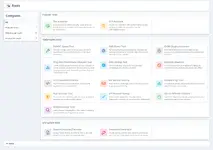
Forumunuza Güçlü Web Araçları Ekleyin!
Tools Suite, XenForo 2.3.x için geliştirilmiş modüler ve genişletilebilir bir araç sistemidir. Kullanıcılarınıza çeşitli web tabanlı araçları doğrudan forum içerisinden sunmanızı sağlar.
Özellikler- Modüler Yapı: Her araç bağımsız olarak çalışır ve yönetilebilir
- Kategori Sistemi: Araçlarınızı kategorilere ayırarak düzenleyin
- Kullanım Kotası: Kullanıcı gruplarına göre günlük sorgu limitleri
- Site Yönetimi: Kullanıcılar sık kullandıkları siteleri...
XENTR Tools Suite - Kurulum Adımları
═══════════════════════════════════════════════════════════
Adım 1: Eklentiyi Yükleyin═══════════════════════════════════════════════════════════
1. XenForo Admin Paneline giriş yapın
2. Add-ons > Install/upgrade from archive butonuna tıklayın
3. İndirdiğiniz zip dosyasını seçin ve yükleyin
4. Eklentiyi aktif edin
═══════════════════════════════════════════════════════════
 Adım 2: Hazır Araçları İçe Aktarın (ÖNEMLİ!)
═══════════════════════════════════════════════════════════
Eklenti paketi ile birlikte gelen tools_suite_tools.xml dosyasını
içe aktararak 20+ aracı otomatik olarak yükleyebilirsiniz.
İçe Aktarma Adımları:
1. Admin Panel > Tools Suite > Tools sayfasına gidin
2. Sağ üst köşedeki "Import" butonuna tıklayın
3. Açılan pencerede "Dosya Seç" butonuna tıklayın
4. İndirdiğiniz zip dosyası içindeki tools_suite_tools.xml
dosyasını seçin
5. "Import" butonuna tıklayın
6. İşlem tamamlandığında tüm araçlar otomatik olarak yüklenecektir
XENTR Tools Suite - Installation Steps
═══════════════════════════════════════════════════════════
Step 1: Install the Addon═══════════════════════════════════════════════════════════
1. Log in to XenForo Admin Panel
2. Click Add-ons > Install/Upgrade from Archive
3. Select the downloaded zip file and upload it
4. Activate the addon
═══════════════════════════════════════════════════════════
Step 2: Import Ready Tools (IMPORTANT!)═══════════════════════════════════════════════════════════
By importing the tools_suite_tools.xml file included with the
addon package, you can automatically load 20+ tools.
Import Steps:
1. Go to Admin Panel > Tools Suite > Tools page
2. Click the "Import" button in the top right corner
3. In the popup window, click "Choose File" button
4. Select the tools_suite_tools.xml file from the downloaded
zip package
5. Click the "Import" button
6. When the process completes, all tools will be automatically
loaded
![[XTR] AI Assistant](/data/product_icons/0/100_xxs.jpg?1777593877)
![[XTR] Social Feed Pro](/data/product_icons/0/109_xxs.jpg?1780773470)
![[XTR] User Group Banners](/data/product_icons/0/111_xxs.jpg?1781889883)
![[XTR] Thread Prefix Pro](/data/product_icons/0/110_xxs.jpg?1781304825)
![[XTR] Trade Points System](/data/product_icons/0/102_xxs.jpg?1777593886)