XenTR kullanıcımız yeni bir ürün yayınladı: [XTR] DragonByte eCommerce Layouts 1.1.0 - Advanced columns for DragonByte eCommerce
[XTR] DragonByte eCommerce Layouts 1.1.0
Ürün Açıklaması
Bu eklenti DragonByte eCommerce eklentisini görsel açıdan zenginleştirmek aynı zamanda kullanım kolaylığı sağlamak maksadı ile geliştirilmiştir.
Kısaca bu eklenti ile DragonByte eCommerce ürün sayfalarını özelleştirmenize imkan tanır.
Ürünlerin listelenen görünümü
Bildiğiniz gibi DragonByte eCommerce eklentisi gelişmiş özelliklere sahip bir e-ticaret eklentisidir. Her ne kadar kendi içerisinde grid sistemi mevcut olsa da bu eklenti ile ürünlerinizi daha stabil bir görünüme kavuşturabilirsiniz.
Ürünlerin grid görünümü
Not: Bu eklenti yalnızca DragonByte eCommerce stil özelliklerinde yer alan Product list style: Grid seçili ise çalışmaktadır.
Not: Eklentiyi yükledikten sonra aşağıdaki resimde gösterildiği gibi ürünlerinize ait ikon boyutlarını ayarlamanız gerekir. Biz örnek olarak 590px / 300px olarak ayarlamış bulunuyoruz. Siz tercihinize göre ayarlayabilirsiniz.
Ekli dosyalar için slider özelliği
Eklenti ile artık ekli dosyalar bir slider ile otomatik olarak görüntülenebilmektedir. Çok fazla ek resimlere sahip ürünleriniz için idealdir. Bu sayede ek resimlerin sayfa üzerinde oluşturduğu kalabalık yapıdan uzaklaşmış olursunuz.
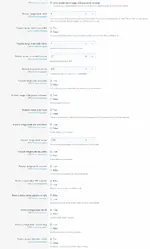
Ekli dosyalar slider ayarları
Extra Bağlantı adresi
Ürünlerinizi daha detaylı tanıtabilmek için extra url yani demo adresleriniz varsa bunları ürün eklerken rahatlıkla tanımlayabilirsiniz.
Widget slider özelliği
Widget yapısı üzerine kurulan kaydırıcı sayesinde yeni ürünlerinizi her alanda gösterin. Bu sayede sayfayı kaplayan geniş ürün alanlarının daha şık görünmesini sağlayabilirsiniz.
Ayrıca bir ürünü incelerken tekrar ürün ana sayfasına gitmeden ürün açıklamalarının en altına indiğinizde, mağazanızda yer alan diğer ürünleri slider içersinde listeleyebilirsiniz.
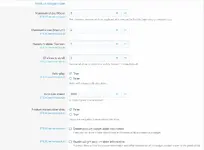
Widget slider stil özellikleri
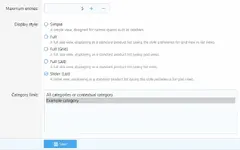
Widget slider ayarları
Ürün detay sayfası
This add-on has been developed to enhance the DragonByte eCommerce add-on visually and at the same time provide ease of use.
As you know, DragonByte eCommerce add-on is an e-commerce add-on with advanced features. Although there is a grid system in it, you can make your products look more stable with this add-on.
As a result, this add-on allows you to customize DragonByte eCommerce product pages.
Listed view of products
As you know, DragonByte eCommerce plugin is an e-commerce plugin with advanced features. Although there is a grid system in it, you can make your products look more stable with this plugin.
Grid view of products
Note: This add-on works only, if Product list style option is selected Grid on DragonByte eCommerce. You can find easily this option on Style Properties.
After installation you need to set the icon size of your products as shown in the picture as below. We have set 590px / 300px as an example. You can adjust it to your preference.
Slider for attached files
With the plugin, the attached files can now be displayed automatically with a slider. Ideal for your products with lots of additional images. In this way, you will stay away from the crowded structure created by additional images on the page.
Attached files slider settings
Extra Link address
In order to promote your products in more detail, if you have extra url or demo addresses, you can easily define them while adding products.
Widget slider feature
Show your new products in every area thanks to the slider built on the widget structure. In this way, you can make the large product areas covering the page look more elegant.
In addition, when you go to the bottom of the product descriptions without going back to the product home page, you can list other products in your store in the slider.
Widget slider style properties
Widget slider settings
Product detail page
Genişletilmiş Ürün Bilgisi
Bu ürün hakkında daha fazla bilgi edinin ...
[XTR] DragonByte eCommerce Layouts 1.1.0
Ürün Açıklaması
Bu eklenti DragonByte eCommerce eklentisini görsel açıdan zenginleştirmek aynı zamanda kullanım kolaylığı sağlamak maksadı ile geliştirilmiştir.
Kısaca bu eklenti ile DragonByte eCommerce ürün sayfalarını özelleştirmenize imkan tanır.
Ürünlerin listelenen görünümü
Bildiğiniz gibi DragonByte eCommerce eklentisi gelişmiş özelliklere sahip bir e-ticaret eklentisidir. Her ne kadar kendi içerisinde grid sistemi mevcut olsa da bu eklenti ile ürünlerinizi daha stabil bir görünüme kavuşturabilirsiniz.
Ürünlerin grid görünümü
Not: Bu eklenti yalnızca DragonByte eCommerce stil özelliklerinde yer alan Product list style: Grid seçili ise çalışmaktadır.
style-properties/group&group=dbtechEcommerceNot: Eklentiyi yükledikten sonra aşağıdaki resimde gösterildiği gibi ürünlerinize ait ikon boyutlarını ayarlamanız gerekir. Biz örnek olarak 590px / 300px olarak ayarlamış bulunuyoruz. Siz tercihinize göre ayarlayabilirsiniz.
admin.php?options/groups/dbtechEcommerce/Ekli dosyalar için slider özelliği
Eklenti ile artık ekli dosyalar bir slider ile otomatik olarak görüntülenebilmektedir. Çok fazla ek resimlere sahip ürünleriniz için idealdir. Bu sayede ek resimlerin sayfa üzerinde oluşturduğu kalabalık yapıdan uzaklaşmış olursunuz.
Ekli dosyalar slider ayarları
Extra Bağlantı adresi
Ürünlerinizi daha detaylı tanıtabilmek için extra url yani demo adresleriniz varsa bunları ürün eklerken rahatlıkla tanımlayabilirsiniz.
Widget slider özelliği
Widget yapısı üzerine kurulan kaydırıcı sayesinde yeni ürünlerinizi her alanda gösterin. Bu sayede sayfayı kaplayan geniş ürün alanlarının daha şık görünmesini sağlayabilirsiniz.
Ayrıca bir ürünü incelerken tekrar ürün ana sayfasına gitmeden ürün açıklamalarının en altına indiğinizde, mağazanızda yer alan diğer ürünleri slider içersinde listeleyebilirsiniz.
Widget slider stil özellikleri
Widget slider ayarları
Ürün detay sayfası
This add-on has been developed to enhance the DragonByte eCommerce add-on visually and at the same time provide ease of use.
As you know, DragonByte eCommerce add-on is an e-commerce add-on with advanced features. Although there is a grid system in it, you can make your products look more stable with this add-on.
As a result, this add-on allows you to customize DragonByte eCommerce product pages.
Listed view of products
As you know, DragonByte eCommerce plugin is an e-commerce plugin with advanced features. Although there is a grid system in it, you can make your products look more stable with this plugin.
Grid view of products
Note: This add-on works only, if Product list style option is selected Grid on DragonByte eCommerce. You can find easily this option on Style Properties.
style-properties/group&group=dbtechEcommerceAfter installation you need to set the icon size of your products as shown in the picture as below. We have set 590px / 300px as an example. You can adjust it to your preference.
admin.php?options/groups/dbtechEcommerce/Slider for attached files
With the plugin, the attached files can now be displayed automatically with a slider. Ideal for your products with lots of additional images. In this way, you will stay away from the crowded structure created by additional images on the page.
Attached files slider settings
Extra Link address
In order to promote your products in more detail, if you have extra url or demo addresses, you can easily define them while adding products.
Widget slider feature
Show your new products in every area thanks to the slider built on the widget structure. In this way, you can make the large product areas covering the page look more elegant.
In addition, when you go to the bottom of the product descriptions without going back to the product home page, you can list other products in your store in the slider.
Widget slider style properties
Widget slider settings
Product detail page
Genişletilmiş Ürün Bilgisi
Bu ürün hakkında daha fazla bilgi edinin ...
Attachments
-
 icon_dimensions.webp5.4 KB · Views: 1,781
 -
 product-attachments.webp18.4 KB · Views: 1,527
 -
 extra_url.webp3.4 KB · Views: 1,263
 -
 product-slider.webp33.7 KB · Views: 1,286
 -
 list_columns.webp57.6 KB · Views: 1,718
 -
 public_products_colums.webp217.3 KB · Views: 1,683
 -
 widget-slider-settings.webp19 KB · Views: 1,495
 -
 product_attachments_settitngs.webp65.4 KB · Views: 1,602
 -
 widget-slider-style-properties.webp28.7 KB · Views: 1,298
 -
 products_details.webp156.6 KB · Views: 1,350
Last edited: